
How Much Does a CaptionCall Phone Cost in 2026?
If you or someone you care about struggles to understand telephone conversations because of hearing loss, a CaptionCall phone may make everyday calls easier. But how much does it actually cost? Do you have to buy the phone, pay a monthly fee, or cover installation?
Wondering how much a CaptionCall phone costs? For eligible people with hearing loss, CaptionCall advertises its home phone and captioning service at no cost, and complimentary delivery and setup options may be available. But there’s a detail worth checking before you register: a CaptionCall page also lists a $75 purchase option. Does everyone have to pay it? Not necessarily; the offer shown may depend on the registration route and terms. You may also need to cover your internet, telephone, or mobile plan. This guide explains the advertised price, eligibility, extra expenses, and how to verify your offer before paying.
CaptionCall advertises its home phone and captioning service at no cost to eligible users who need captions because of hearing loss. Delivery, installation, and support are also advertised as complimentary. However, the provider’s registration page describes a separate $75 purchase option, and expenses for internet, telephone, or mobile service may remain your responsibility.
This guide explains the difference between the two pricing options, the costs you may still encounter, who qualifies, how the service works, and how to check the latest terms before registering.
1. How Much Does a CaptionCall Phone Cost in 2026?
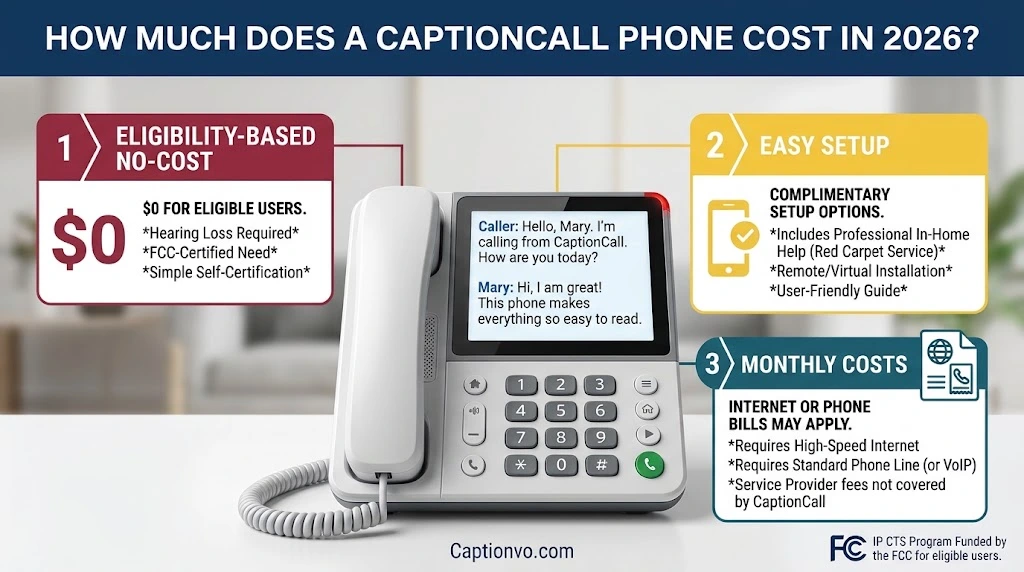
The advertised price is $0 for eligible users under CaptionCall’s no-cost home-phone offer. That includes the captioning service and the telephone provided through the qualifying program. Sorenson also advertises complimentary delivery, installation and ongoing support.
Here is the practical cost breakdown.
| Item | Expected cost or treatment |
| CaptionCall home phone under the eligible-user offer | $0 |
| CaptionCall call-captioning service | $0 to eligible registered users |
| Advertised home-phone delivery | Complimentary |
| Advertised installation and setup | Complimentary options |
| Training and ongoing support | Included in the advertised service |
| Separate $75 purchase option | Listed on CaptionCall’s registration page; confirm current terms |
| Existing internet subscription | May remain your responsibility |
| Existing telephone plan | May remain your responsibility |
| Smartphone and cellular data | Separate costs may apply if you use them |
The key distinction is between CaptionCall’s advertised service and your household’s other communication expenses. A no-cost telephone does not automatically pay for every third-party service you use with it.
Also, the provider states that the CaptionCall phone remains its property under the service terms so it can provide continued support and upgrades. Do not assume that receiving the device means you own it outright.
Before you register, verify which offer applies to your order and ask about any amount displayed during enrollment.
2. Is CaptionCall Really Free for Eligible Users?
Yes. CaptionCall’s official home-phone page advertises both the phone and the captioning service at no cost to qualifying individuals who need captions to communicate effectively by telephone.
CaptionCall is not an unrestricted free-phone giveaway. It is an accessibility service for people whose hearing loss makes telephone captions necessary. Eligible users must complete the required registration and self-certification.
A CaptionCall phone works much like a regular telephone, but it displays the other person’s spoken words as text. The user can listen and read along, making it easier to follow conversations and confirm important details such as appointment dates, names and addresses.
when they can communicate reasonably well in person.
There is no need to purchase the phone through the separate $75 option merely because a third-party page mentions that amount. First confirm that you qualify for the current no-cost offer and that you are using the correct registration route.
3. What Is Included in the No-Cost CaptionCall Offer?
The advertised no-cost offer covers more than the basic hardware. Eligible users can receive the home phone and captioning service, along with advertised delivery, setup and support.
Here is what those benefits mean in practice.
The CaptionCall home phone: The dedicated telephone displays captions on a screen as the other person speaks. Its familiar handset and controls can be useful for people who prefer a home phone to a smartphone.
Telephone captioning: The service converts the other caller’s speech into text so the registered user can read along. Captioning is the core accessibility feature.
Delivery and installation: Sorenson advertises a complimentary in-home installation option known as Red Carpet Service. This includes delivery, setup and hands-on instruction. A self-installation option with remote guidance is also advertised.
Training and support: Users can receive help learning the phone’s functions and setting it up for everyday calls.
CaptionCall Mobile: Eligible users can also access CaptionCall Mobile on a compatible smartphone or tablet, subject to its registration and technical requirements. The provider says qualified users can have both the home-phone service and mobile app at no cost.
These inclusions make CaptionCall different from buying an ordinary telephone from a retail store. The offer is linked to an accessibility program, so eligibility and registration determine access to the no-cost service.
4. Why Does the CaptionCall Registration Page Mention a $75 Fee?
This is the main pricing discrepancy readers should understand before they apply.
CaptionCall’s registration page contains wording describing a $75 purchase option. It explains that this payment is for a licensing agreement to activate and use the CaptionCall phone and service. Meanwhile, CaptionCall’s public home-phone page advertises the phone and captioning service at no cost to eligible users.
These are different offers presented through the provider’s online information. The existence of the $75 purchasing option does not establish that every eligible user must pay $75 to receive a CaptionCall phone.
The safest way to understand the difference is to check which route you are using:
| Question | What to understand |
| Does CaptionCall advertise a no-cost offer? | Yes, for eligible users who need captioning because of hearing loss. |
| Does a CaptionCall page mention $75? | Yes, the registration page describes a separate purchase/licensing option. |
| Does every eligible user have to pay $75? | The published information does not establish that. |
| Should you pay an unexpected fee without checking? | No. Confirm the applicable offer directly with the provider first. |
Start with the official CaptionCall home-phone page. You can also contact CaptionCall at 1-877-557-2227 and ask whether your application qualifies for the no-cost program or uses the separate purchase option. The provider lists this number for CaptionCall inquiries.
Important: Do not assume an older third-party price listing describes the current terms. Confirm the current offer, any payment request, and whether the phone is being provided under the no-cost service arrangement before proceeding.
5. Does CaptionCall Charge a Monthly Fee?
CaptionCall advertises its qualifying captioning service at no cost to registered users who meet the program requirements. There is no direct monthly subscription charge for that qualifying captioning service under the advertised offer.
However, your total household expenses depend on how your phone is connected.
For example, a household that already pays for the internet or telephone service needed for its chosen setup may not need a new subscription. A household that needs a new connection may have additional monthly expenses.
Those bills should be distinguished from CaptionCall’s captioning fee.
| Monthly expense | What to check |
| CaptionCall Captioning | Advertised at no cost to eligible users |
| Existing internet service | Whether your current plan meets the setup requirements |
| Existing telephone service | Whether you will retain the current plan or number |
| Mobile plan or data | Whether you use CaptionCall Mobile or a supported mobile connection |
| Other telephone charges | Your carrier’s terms for the services you use |
There is therefore no single monthly total that applies to every household. The most useful calculation is to identify what you already pay, determine whether your current connection works, and add only the expenses that your chosen setup actually requires.
6. What Hidden or Additional Costs Might CaptionCall Users Pay?
The most likely additional expenses relate to connectivity and services outside CaptionCall’s advertised offer.
Internet: If your chosen configuration requires high-speed internet and you do not already have suitable service, you may need an internet subscription. The bill comes from your internet provider.
Telephone service: If your setup uses an existing telephone plan, charges under that plan may continue. Confirm whether you can retain your current number and provider before making changes.
Mobile service: Using CaptionCall Mobile requires a compatible mobile device and an appropriate connection. Your smartphone, cellular subscription and any applicable data charges are separate considerations.
Other telephone charges: Long-distance calls, international calls, or other services can be governed by your telephone provider’s plan. Do not assume that CaptionCall covers fees imposed by an unrelated carrier.
The provider says users may be able to keep their existing home phone number and telephone provider, but your particular connection should be confirmed during registration.
Before you commit, ask the provider which connection options are supported for your specific setup and whether any additional equipment or third-party subscription is required.
More to Explore: https://captionvo.com/why-is-having-a-caption-phone-illegal/
7. Does CaptionCall Require You to Pay for Internet or Telephone Service?
Not every household has the same setup, and the connection requirement should be confirmed for the particular service arrangement you select.
Sorenson’s published information describes ways to connect CaptionCall using high-speed internet, landline telephone service, or a smartphone and data connection, depending on the supported configuration. It also says users may be able to keep their existing home phone number and service provider.
The important point is that CaptionCall’s no-cost offer does not automatically include a new internet or telephone subscription.
Before changing your service, ask three questions:
- Can the CaptionCall configuration you will receive work with the connection you already have?
- Will you need to keep paying for your current telephone plan?
- Will using the phone require you to purchase a separate internet or mobile-data subscription?
The answers will help you estimate your household’s actual cost instead of relying on the advertised phone price alone.
Do not cancel existing telephone service or purchase a new internet plan until CaptionCall confirms the connection requirements for your specific setup.
8. Are CaptionCall Delivery, Installation, and Training Free?
Sorenson advertises complimentary delivery and installation for its home phone, including an in-home Red Carpet Service option and self-installation with remote trainer assistance. Its service material also describes ongoing customer support.
The in-home option may be useful for seniors or users who prefer practical help rather than following a written setup guide.
The process generally involves delivery, installation, an explanation of the phone’s features, and guidance on making captioned calls. If you prefer to set up the phone yourself, ask about the remote assistance option available for your order.
Before the appointment, confirm:
- Whether complimentary in-home installation is available in your area.
- Whether remote guidance is an alternative for your order.
- Whether the service includes training on the device’s display, volume and calling functions.
- Whether any part of your specific installation carries a separate charge.
Although complimentary options are advertised, confirming your arrangement avoids confusion about what the provider will deliver and set up.
9. Who Qualifies for a Free CaptionCall Phone?
CaptionCall is Intended for people whose hearing loss makes captions necessary to communicate effectively by telephone. Applicants must complete the required registration and self-certification process.
Use this checklist as a starting point:
- You have hearing loss that makes telephone conversations difficult to understand without captions.
- You need captions to use the telephone effectively.
- You can complete the program’s required registration and self-certification.
- You are applying for a service available in your location.
Age alone does not determine eligibility. Being a senior does not automatically qualify someone, and being younger does not automatically disqualify someone. The main consideration is the communication need associated with hearing loss, together with the program requirements.
You do not necessarily need to stop using hearing aids to benefit from captioning. Some people find it helpful to listen with hearing aids while reading the words displayed on the screen. Sorenson’s eligibility information says a referral or recommendation from a hearing-care provider is not required to determine whether you qualify.
CaptionCall and CaptionCall Mobile are available in the United States only, according to Sorenson’s published support information.
If you are uncertain about eligibility, review the official CaptionCall eligibility information before submitting your application.
More to Explore: https://captionvo.com/is-there-a-monthly-fee-for-a-captel-phone/
10. How Does the FCC Fund CaptionCall’s Free Phone Service?
CaptionCall operates under the federal Internet Protocol Captioned Telephone Service (IP CTS) program. The program supports telephone access for people who have qualifying hearing loss and need captions to communicate effectively.
Here is how the arrangement works:
- An eligible person registers and completes the required self-certification.
- The person makes or receives telephone calls and uses captions when needed.
- The provider delivers the captioning service under the IP CTS program.
- The program reimburses providers for eligible captioning services using funds collected through the telecommunications relay system.
The FCC administers the program, and the Telecommunications Relay Services Fund supports eligible relay services. This funding arrangement explains why CaptionCall can advertise captioning at no cost to qualifying users instead of billing them a regular monthly captioning subscription.
The service is not free because captioning has no cost to provide. Rather, the expense is funded through the program instead of being charged directly to eligible users.
There are also rules governing who may use IP CTS. The registration process helps confirm that the service is being used by people who need it.
For readers who want the underlying rules, consult the FCC’s official IP CTS regulatory information and the applicable federal regulations for internet-based telecommunications relay services.

11. Can You Use CaptionCall Without a Traditional Landline?
You may not need a traditional landline, but the exact requirements depend on your selected configuration. Sorenson’s published CaptionCall information describes multiple connection possibilities and advises customers to discuss their circumstances with the provider.
Consider the following situations.
You already have high-speed internet. Ask whether your existing connection meets the requirements for the home phone being offered.
You have a traditional landline but no internet. Ask whether the proposed CaptionCall configuration supports your existing connection. Do not assume every phone model or setup works identically.
You mainly use a smartphone. CaptionCall Mobile may be an appropriate alternative if you meet the eligibility requirements and have a compatible device and connection.
You want to keep your current phone number. Sorenson says users may be able to retain their existing home telephone number and provider. Confirm the details before switching or cancelling anything.
The best connection is the one that works with your actual equipment, provides reliable calls and avoids unnecessary new subscriptions. Confirm the technical requirements with CaptionCall before ordering.
12. Is CaptionCall Mobile Free, and What Does It Cost to Use?
CaptionCall Mobile provides captioned telephone calls through a compatible mobile device. Sorenson says eligible users can use CaptionCall Mobile at no cost and can have both the mobile app and the CaptionCall home phone.
The main cost distinction is between the app service and the device you use to access it.
| Item | Cost consideration |
| Eligible CaptionCall Mobile service | Advertised at no cost |
| Compatible smartphone or tablet | The device is a separate consideration |
| Cellular plan | Paid according to your mobile carrier’s terms |
| Mobile data | May be subject to your plan’s limits |
| Wi-Fi | Depends on your existing internet service |
For someone who already owns a compatible smartphone, the mobile option may avoid the need to arrange a dedicated home-phone installation. On the other hand, a person who prefers a large screen and familiar handset may find the home phone more comfortable.
Check the current CaptionCall Mobile page for compatibility and registration information.
More to Explore: https://captionvo.com/does-captioncall-need-internet-5-things-to-know/
13. How Can You Request a Free CaptionCall Phone?
You can begin through the provider’s official home-phone page. Review the eligibility information and current offer before completing registration.
Follow these steps.
Step 1: Visit the official website.
Open CaptionCall Home Phone to review the current service offer and find the registration options.
Step 2: Check your eligibility.
Confirm that your hearing loss makes captions necessary for effective telephone communication.
Step 3: Complete registration and self-certification.
Provide the information required by the provider and complete the program’s eligibility certification.
Step 4: Confirm the price before continuing.
Ask whether your application is covered by the advertised no-cost offer. If you see a $75 amount or any other payment request, ask what it applies to and whether a no-cost eligible-user option is available.
Step 5: Confirm your connection and installation.
Discuss your current telephone service, internet connection, mobile option and delivery arrangements with CaptionCall.
Step 6: Arrange setup and learn how to use the phone.
Choose an available installation or self-installation arrangement. Follow the supplied instructions to make a test call and adjust the display and audio settings.
Step 7: Keep your confirmation information.
Save any registration confirmation and the provider’s contact details so that you can ask questions about your setup later.
CaptionCall lists 1-877-557-2227 as its phone number on its official home-phone information. Confirm the number on the provider’s website before contacting it.
Avoid buying a used phone solely because it appears inexpensive. The purchase price of used hardware does not establish whether it can be activated or supported under the provider’s current terms.
14. CaptionCall vs. CapTel: Which Captioned Phone Costs Less?
CaptionCall and CapTel are separate captioned-telephone brands. Comparing them requires you to distinguish their respective service offers, equipment arrangements and connection requirements.
CaptionCall advertises its home phone and captioning service at no cost to eligible users. Its registration page also describes a separate $75 purchasing option. A 2026 buyer guide, meanwhile, identifies a roughly $75 outright-purchase price for a particular CapTel phone model. That CapTel price should not be mistaken for CaptionCall’s standard no-cost offer or for the price of every CaptionCall device.
National Telephone Captioning Services+2
| Comparison | CaptionCall | CapTel |
| No-cost service for qualifying users | Advertised | Available under its eligible-user arrangements |
| Home-phone hardware | Advertised at no cost for eligible users | Depends on model and offer |
| Separate $75 option | Listed on CaptionCall’s registration page | A separate purchase option is also advertised for certain CapTel hardware |
| Installation and support | Complimentary options advertised | Depends on the specific provider and model |
| Technical requirements | Confirm the selected configuration with Sorenson | Vary by phone model |
| Best comparison method | Verify your offer and any payment request | Verify model, equipment price and service terms |
Do not choose a provider on price alone. Consider whether the equipment is suitable for the user’s hearing and vision needs, whether installation support is available, which connections are required, and how much the household already spends on telephone or internet service.
If two eligible providers offer their equipment and captioning at no cost, ease of setup, accessibility features and support may matter more than a headline price.
15. People Also Ask About CaptionCall Phone Costs
A: CaptionCall advertises its home phone and captioning service at no cost for eligible users who need captions because of hearing loss. Its registration page also describes a separate $75 purchase option, so confirm which terms apply to your enrollment before proceeding.
A: It can be free for eligible seniors, but age alone does not establish eligibility. The person must need captions to communicate effectively by telephone because of hearing loss and complete the required registration process.
A: There is no direct monthly charge for the qualifying captioning service under the advertised no-cost offer. Separate internet, telephone or mobile-plan expenses may still apply.
A: CaptionCall’s registration page describes a $75 purchasing option associated with a licensing agreement to activate and use the phone and service. This does not establish that every eligible user must pay the amount. Confirm the current terms with the provider.
A: Sorenson advertises complimentary delivery and installation options, including in-home Red Carpet Service and self-installation with remote trainer assistance. Confirm what is available for your order.
Conclusion
CaptionCall advertises its home phone and telephone-captioning service at $0 for eligible users, with complimentary delivery, installation and support options. The provider also has a registration page describing a separate $75 purchase option, so readers should verify the offer attached to their application before paying.
For a household estimating the total expense, the most important questions are whether the user qualifies, whether existing connectivity will work, and whether any third-party service charges will remain.
The best next step is to check the official provider’s current terms, confirm eligibility, and ask about any unexpected upfront charge. With those details established, you can make a better-informed decision without confusing an optional purchasing route with the advertised no-cost service.
Bookmark this guide and share it with a family member or caregiver who is comparing captioned-phone options.











2 thoughts on “CaptionCall Cost: Is the Phone Really Free?”